

Field Service Reports: From Mobile Form to Signed PDF
A field service report app lets technicians complete service reports on a phone or tablet, capture photos and the customer’s signature on site, and produce a branded PDF that is emailed and filed automatically.
What the report should capture
- Customer and site, prefilled from the CRM or ERP.
- Work performed, parts used and time spent.
- Photos before and after.
- Customer signature and name.
- Follow-up actions.
The automated flow
- The technician selects the job and fills in the report.
- The customer signs on the device.
- A PDF report is generated from a template.
- The report is emailed to the customer and stored.
- Parts and hours are sent to the ERP for billing.
- Follow-up tasks are created if needed.
Benefits
- Same-day reports instead of end-of-week paperwork.
- Faster invoicing.
- Fewer disputes thanks to photos and signatures.
- Complete service history per customer.
With Noca
Build the mobile app from a prompt, generate the signed PDF with document generation, store it in Google Drive or Box, and update NetSuite, Priority or Salesforce in flows.
Frequently Asked Questions

What is a field service report app?
It is a mobile app technicians use to record work, photos and customer signatures and produce a service report.
Can customers sign on a phone or tablet?
Yes. Noca forms capture signatures on mobile devices.
Can service reports trigger invoicing?
Yes. Parts and hours can be sent to the ERP automatically for billing.
What are the key elements of a field service report app?
Key points include: Customer and site, prefilled from the CRM or ERP; Work performed, parts used and time spent; Photos before and after; Customer signature and name.
How do you get started with a field service report app?
1) The technician selects the job and fills in the report 2) The customer signs on the device 3) A PDF report is generated from a template 4) The report is emailed to the customer and stored 5) Parts and hours are sent to the ERP for billing.
What else should you consider about a field service report app?
Consider the following: Same-day reports instead of end-of-week paperwork; Faster invoicing; Fewer disputes thanks to photos and signatures; Complete service history per customer.
How does Noca help with a field service report app?
Build the mobile app from a prompt, generate the signed PDF with document generation, store it in Google Drive or Box, and update NetSuite, Priority or Salesforce in flows.
Can I use a field service report app from ChatGPT, Claude or Grok?
Yes. With the Noca MCP Server, ChatGPT, Claude, Grok and other MCP-compatible assistants can run your published Noca flows and use Noca tools for field service report app, within the permission groups and per-tool approvals you set.
Does a field service report app work with Salesforce, NetSuite, SAP and Priority?
Yes. Noca connects natively to Salesforce, NetSuite, SAP, SAP Business One, Priority ERP, HubSpot, monday.com and 60+ other systems, so field service report app can use live data from them and update them automatically.
Do I need developers to implement a field service report app?
No. In Noca you describe what you need in plain language and Noca builds the forms, apps, flows and documents. Developers can extend any process with REST APIs, OpenAPI definitions and webhooks.
How do you keep a field service report app secure?
Use least-privilege permissions, require approval for sensitive actions and keep a log of every run. Noca follows the TRAPS framework (Trusted, Responsible, Auditable, Private and Secure), records every flow run in integration logs and lets you control data storage for specific flows.
How long does it take to implement a field service report app?
A first working version can often be built from a prompt and tested quickly. The total time depends on how many systems, approvals and documents are involved and how much testing your team requires before publishing.
How do I measure the results of a field service report app?
Compare cycle time, manual steps, error rates and adoption before and after. Noca integration logs show how often each process runs, how long it takes and where it fails.
Can Noca build forms from a prompt?
Yes. Noca builds forms and apps from a plain-language description, including fields, validation, conditional logic, uploads and signatures.
Can Noca forms capture signatures?
Yes. Noca forms include signature fields, and each submission can produce a signed PDF.
Can Noca forms use conditional logic?
Yes. Forms support show, hide, mandatory, optional, enable, disable, set value, reset, messages and redirects.
Can form submissions update Salesforce, HubSpot or NetSuite?
Yes. Submit flows can create and update records in CRMs and ERPs connected to Noca.
Can Noca build web apps and portals?
Yes. Noca Apps creates customer portals, internal tools, dashboards and request apps from a prompt, connected to your systems.
Where are Noca apps hosted?
Apps are hosted by Noca and get a live URL when an admin publishes them.
Can I preview and roll back Noca apps?
Yes. You can preview apps on desktop, tablet and mobile before publishing, and restore earlier saved versions.

When building applications and automated workflows, getting data from one place to another is essential. Whether it’s a customer filling out a form, a…
Build an e-signature workflow that collects data with a form, generates the document, captures the signature and files the signed PDF automatically.
Capture customer signatures on phones and tablets in the field: service reports, deliveries and inspections, with instant signed PDFs.

How to check a digitally signed PDF: what the signature panel shows, what valid and invalid mean, and how to issue PDFs that verify cleanly.
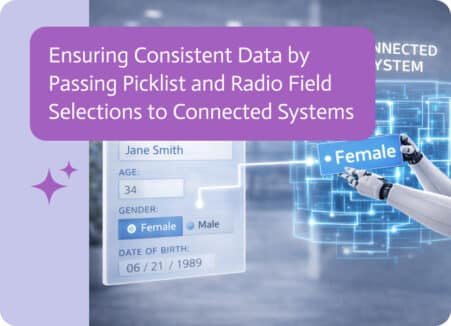
Modern applications often serve as the entry point for data that eventually flows into other business systems such as CRM, ERP, or analytics platforms. Because…