

Automation Audit Trails: Why Integration Logs Matter for AI
An automation audit trail is a record of every workflow run: what triggered it, which steps ran, what data was processed, which decisions were made and whether it succeeded. As AI agents and assistants take actions in business systems, audit trails become essential.
Why audit trails matter
- Troubleshooting: find the exact step and record that failed.
- Compliance: prove who approved what and when.
- Trust: show stakeholders that AI actions are visible and reviewable.
- Improvement: spot bottlenecks and frequent exceptions.
What a good integration log contains
- Run ID, status and timing.
- The trigger and its input.
- Each step with status, duration and record counts.
- Error messages and the step where a run stopped.
- Approvals and who gave them.
Controlling log data
Logs can contain sensitive data. Good platforms let you control which flows store detailed data in logs and for how long.
Audit trails in Noca
Every Noca flow run appears in integration logs with status, trigger, timing, errors and step details, and you can control data storage for specific flows. AI assistants can review runs through the Noca MCP Server with list_runs and get_run.
Frequently Asked Questions

What is an automation audit trail?
It is a record of every workflow run, including the trigger, steps, data, decisions, approvals and outcome.
Why do AI automations need audit trails?
Because AI takes actions in business systems; logs make those actions reviewable, traceable and correctable.
Can I limit sensitive data in logs?
Yes. Noca lets you control data storage for specific flows in integration logs.
What are the key elements of an automation audit trail?
Key points include: Troubleshooting: find the exact step and record that failed; Compliance: prove who approved what and when; Trust: show stakeholders that AI actions are visible and reviewable; Improvement: spot bottlenecks and frequent exceptions.
How do you get started with an automation audit trail?
1) Run ID, status and timing 2) The trigger and its input 3) Each step with status, duration and record counts 4) Error messages and the step where a run stopped 5) Approvals and who gave them.
How does Noca help with an automation audit trail?
Every Noca flow run appears in integration logs with status, trigger, timing, errors and step details, and you can control data storage for specific flows. AI assistants can review runs through the Noca MCP Server with list_runs and get_run.
Can I use an automation audit trail from ChatGPT, Claude or Grok?
Yes. With the Noca MCP Server, ChatGPT, Claude, Grok and other MCP-compatible assistants can run your published Noca flows and use Noca tools for automation audit trail, within the permission groups and per-tool approvals you set.
Does an automation audit trail work with Salesforce, NetSuite, SAP and Priority?
Yes. Noca connects natively to Salesforce, NetSuite, SAP, SAP Business One, Priority ERP, HubSpot, monday.com and 60+ other systems, so automation audit trail can use live data from them and update them automatically.
Do I need developers to implement an automation audit trail?
How do you keep an automation audit trail secure?
Use least-privilege permissions, require approval for sensitive actions and keep a log of every run. Noca follows the TRAPS framework (Trusted, Responsible, Auditable, Private and Secure), records every flow run in integration logs and lets you control data storage for specific flows.
How long does it take to implement an automation audit trail?
A first working version can often be built from a prompt and tested quickly. The total time depends on how many systems, approvals and documents are involved and how much testing your team requires before publishing.
How do I measure the results of an automation audit trail?
Compare cycle time, manual steps, error rates and adoption before and after. Noca integration logs show how often each process runs, how long it takes and where it fails.
Can Noca automate workflows?
Yes. Noca Flows include triggers, conditions, loops, approvals, documents, signatures and AI steps.
What can trigger a Noca flow?
Can I see what each automation did?
Yes. Every flow run is recorded in integration logs with status, timing, errors and the step where it stopped.
Which integrations does Noca support?
Noca offers 60+ integrations, including Salesforce, NetSuite, SAP, Priority, HubSpot, Microsoft Dynamics 365, monday.com, Zendesk, Slack, Google Workspace, Microsoft 365, DocuSign and Shopify.
Can Noca connect to systems without a native connector?
Yes. Noca can call any REST API, import OpenAPI definitions, use OData services and SQL databases, and start flows from webhooks.
What is Noca?
Noca is an AI-powered business process automation platform that combines forms, document generation, e-signatures, workflow automation, AI agents and 60+ integrations, with an MCP server for ChatGPT, Claude and Grok.
Do I need to code to use Noca?
No. Noca builds apps, flows, bots and documents from plain-language prompts; developers can extend them with APIs and webhooks.
Is Noca secure?
Noca follows the TRAPS framework (Trusted, Responsible, Auditable, Private and Secure), with permissions, approvals and integration logs.

Integration logs are most useful when they clearly show where each action came from. When an app contains multiple flows and integrations, it can be…
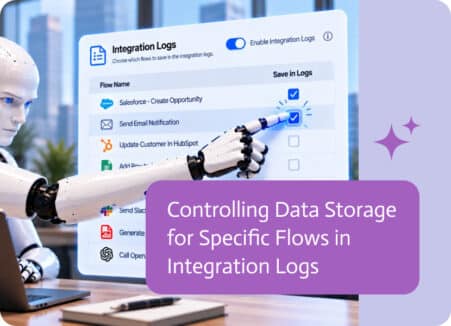
When businesses connect different systems and automate processes, information moves between applications every day.

Account activity, integrations, API calls, events—each one records something that happened at a specific moment in time.
A practical framework for governing AI agents in business: permissions, approvals, audit logs, testing, data controls and ownership.
Artificial Intelligence (AI) has been shaking up creative industries for years now, and storytelling is no exception. Writers of all kinds—whether novelists, content marketers, or…