

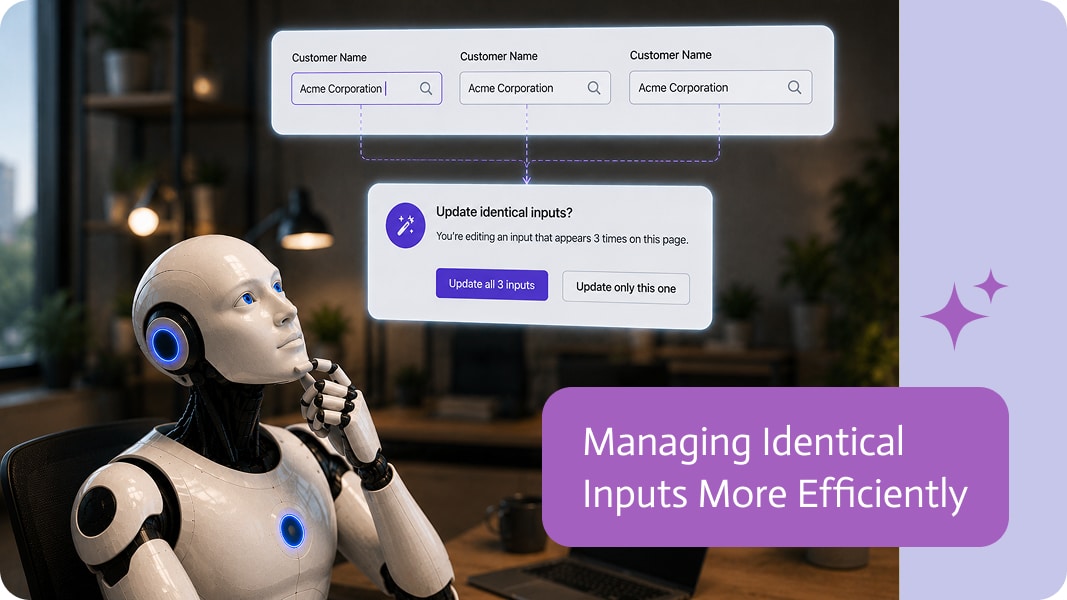
Managing Identical Inputs More Efficiently
As applications become more sophisticated, the same input is often used in multiple places on a page. An input may appear in different sections, reusable components, or layouts to create a consistent user experience.
When it’s time to update one of those inputs, builders should be able to decide whether the change applies everywhere or only where they’re currently working.
Update One or Many
Imagine using the same Phone Number input in several places throughout a page.
If you decide to change its label, styling, validation, or behavior, you may want every matching input to stay consistent. In other cases, you may only want to customize the single input you’re editing.
Having both options makes the editing process much more flexible.
Maintain Consistency with Less Effort
Updating identical inputs one at a time is repetitive and increases the chance that some instances will be forgotten.
Applying changes across matching inputs helps maintain consistency throughout the application while significantly reducing manual work.
Customize Where It Makes Sense
Consistency is important, but flexibility is equally valuable.
There are times when a single input needs to behave differently from the others. Giving builders the choice between updating one input or all matching inputs allows applications to remain both consistent and adaptable.
Smarter Editing for Modern Apps
The more reusable components and shared elements an application contains, the more valuable this flexibility becomes.
By making it easy to choose where changes should apply, builders can work faster, reduce repetitive edits, and maintain cleaner, more consistent applications.

Remember when you had to spend months learning to code or pay thousands to a web designer to create a website? Well, say hello to…
A Case in Salesforce represents a customer issue or problem, such as a service request, complaint, or inquiry. This object helps businesses track, prioritize, and…

Working with files in S3 is usually simple enough when everything always goes to the same place. One bucket. One folder. One predictable setup. Beautiful,…